
Embracing the platform: the DOM as your component model
Posted onCleaning up some terms and concepts
Before we dive in, you may notice that I use the words “Web Components” and “Custom Elements” interchangeably. But I want to clarify something. Typically when I say “Web Component” I’m talking about a custom element that implements a shadow dom by registering it through the custom element API and uses a HTML Templates like slot. When I say “custom element” I am literally talking about the associated custom html tag, like <blog-header>. I get that this distinction might seem overly nuanced to those new to Web Components. But that’s kinda the point. You should start learning what these things mean because web components are part of the platform. They are standard JavaScript.
The major difference between a “component” in a UI library like React and a web component is that a web component always has an associated custom element. React uses a virtual dom and discourages you from accessing the actual dom unless you need to. An example of a need would be calling .focus on an input element or something. Web Components are the opposite. The entire model is dom-centric. React introduces concepts that are completely unnecessary when working with web components, like a ref. You don’t need a ref to the dom when working with a web component. You are always working with the dom.
When you work with React you are rendering pieces of HTML in the entire document. This is called the light dom. The light dom is just the standard document you’re used to. When working with a web component, you create a custom element and give it a shadow dom. The shadow is like the inner mechanics of the component. You put things here that, for the most part, should be private. This is how a custom element creates a “scope”. Think of it like this: you don’t need to know about the inner mechanics of a <select> element, right? All you’re cornered with is giving the users the ability to select some options. Web components work exactly the same. You are not just rendering some HTML. You are creating mechanics with an API via a custom element. That and you configure that API through attributes/properties (think of the selected attribute on a <select>). You perform actions through methods. (Think of .focus). And you get data from the web component by events. More on that later.
Web Component API examples
Attributes/Properties
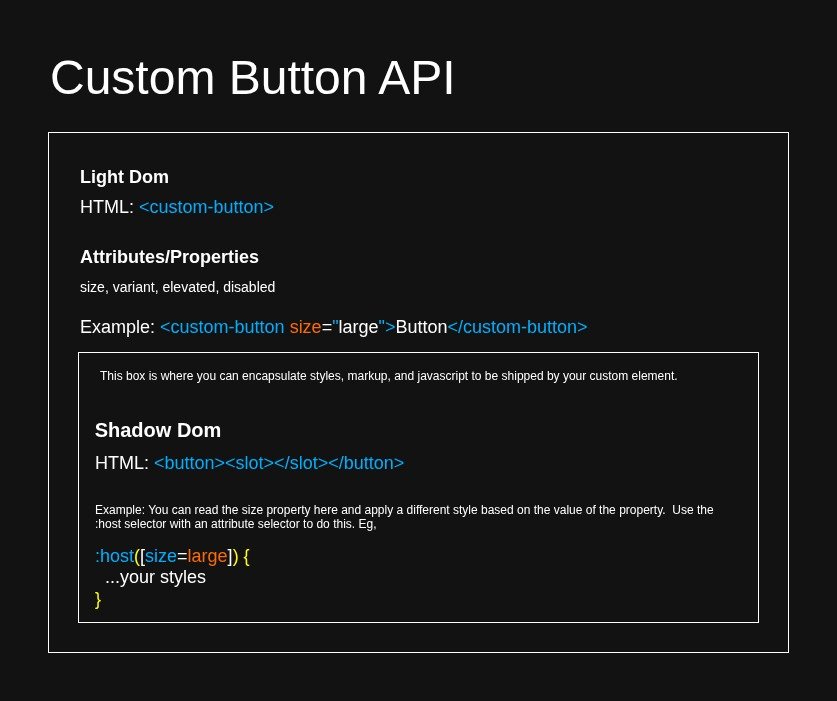
The following illustrates <custom-button>. <custom-button> has a simple API with four properties, size, variant, elevated, disabled. The custom element “<custom-button>” is part of the light dom. You can use HTML attributes to set the properties. So for example, <custom-button size="large"> will set the size property to large via an attribute. The markup of the actual button is part of the shadow dom.
Slot
<button>
  <slot></slot>
</button>
Coming from a React background, you can think of a <slot> as children. With web components a slot is deeper than children though. With web components a slot actually means “display this piece of light dom here in the shadow dom of this component”. This gets more complicated when you have named slots with complex components that are displaying pieces of light dom. But that’s out of scope for this discussion.
Methods
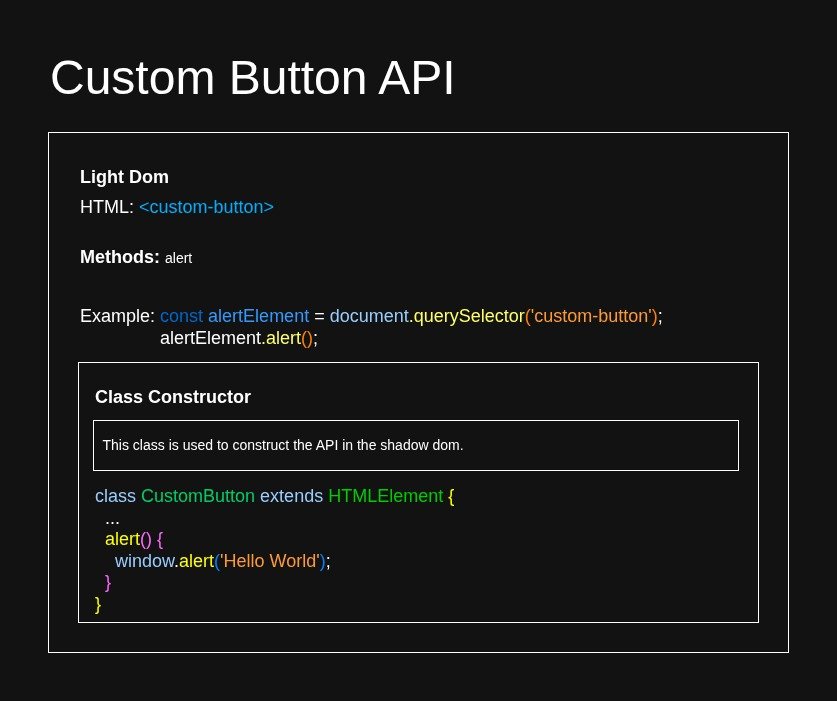
Here we work with methods. Methods are how you perform actions with your Web Component. Every function you define in your class that constructs the web component is a method. You can call methods with refToElement.methodName(). So just like you use window.alert() to call the alert method on the window object, you can call the alert method we have defined on the custom-button the same way.
Events
Events are how you get data out of a Web Component. Let’s assume our custom button makes a call to an API and fetches some data. In practice a button shouldn’t be doing this but that’s besides the point. The point is that we have data from an API in our component. We then want another component to have access to this data. Let’s assume this component that needs the data is ascended, not descendant, of our custom button. So we can’t “prop drill” and just pass the data down to the component. This is where you’ll use a custom event.
Custom events are standard Javascript. You never use them in React because React is dom-phobic. A custom event can have a payload. You send your payload with details. In our case we want the data from the API to be sent in the payload. To get a feel for this, read more about constructing custom events if you’re unfamiliar.
Once you have created a custom event and fire it, you can simply listen to that event, like you would a click event, and attach your handler function to the listener. In the event object of the handler you’ll have access to details where you can grab the data and do what you want with it.
You could, of course, use a state management solution to share the data but that’s outside the scope of this discussion. This discussion is about thinking in terms of the platform, the dom.
Final Thoughts
This has been a small primer on what is necessary to work with a component in terms of the DOM and not as some library abstraction like in the case of React. It’s a bit more high level than a lot of my blogs, but I hope this helps if you’re suffering from React Brain. I know it may seem like I’m either Anit-React or maybe just picking on it. But that’s because the reality is that React is so popular that I’ve seen a lot of devs who are unfamiliar with basic and standard JavaScript because of it.
I’m well aware that some other libs often use web components as a basis for their component models. But typically when developers know these libraries they often know standard JavaScript as well. That’s not the case with React. So that’s why I’m picking on it. Knowing standard JavaScript is very important as a developer. React is great for complex data driven UIs but not every project on the web needs its complexity or ecosystem.